
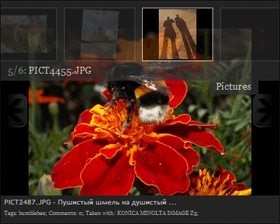
I created small JavaScript for view Photos from PicasaWeb, you can use it for your Google Pages Site or for any another site.
This javascript allows you to incorporate a “smoothgallery” slide show of photos generated from a picasa web album in your site.
Google Gadget
You can use “Google Photogallery” as gadget, use link:
http://photogallery.hohli.com/photogallery.xml
For configure gadget you need your Google Id and album alias, you can get it from URL:
http://picasaweb.google.com/116535900041679154752/DigitalPhotoRu/
In this example 116535900041679154752 – my Google Id, DigitalPhotoRu – alias for album Digital-photo.ru
Installation with out gadget
Step 1
For Google pages
Upload all files from archiv to Google pages.
Open ‘page editor’, click on link ‘edit html’ and past next code (you can see example in index.html):
<link rel="stylesheet" href="jd.gallery.css" type="text/css" media="screen" />
<script src="mootools.js" type="text/javascript"></script>
<script src="jd.gallery.js" type="text/javascript"></script>
<script src="picasa.gallery.js" type="text/javascript"></script>
For all another sites
Open HTML file in any editor (e.g. notepad) and paste next code beetwen tags ‘head’:
<link rel="stylesheet" href="css/jd.gallery.css" type="text/css" media="screen" />
<script src="scripts/mootools.js" type="text/javascript"></script>
<script src="scripts/jd.gallery.js" type="text/javascript"></script>
<script src="scripts/picasa.gallery.js" type="text/javascript"></script>
Step 2
Insert this is code… (change params ‘user’ and ‘album’):
<script type="text/javascript">
    var userid = 'AntonShevchuk';
    var album = 'DigitalPhotoRu';
    var maxres = 5; // 0 - for all;

    var url = 'http://picasaweb.google.com/data/feed/api/user/' + userid + '/album/' + album + '?kind=photo&alt=json-in-script&callback=renderer&access=public&start-index=1';

    if (maxres != 0) {
        url = url + '&max-results=' + maxres;
    }
    loadJS(url);
</script>
and this…:
<div id="myGallery"></div>
Hmmm, not working! I added the URL http://antonshevchuk.googlepages.com/photogallery.xml to my iGoogle page. That worked, and I could see the DigitalPhotoRu album properly. But as soon as I tried my own username and photo album, nothing!
– I tried changing my album from private to public – still nothing.
– I tried capitalization – not case sensitive, but still nothing.
– I tried other people’s public albums – still nothing.
– I tried removing spaces from the album name – SUCCESS!
I suggest you allow spaces in album names – quite common and it is allowed by PicasaWeb.
Hi.
I’m Triing to use smoothgallery in joomla for showing photos stored in picassa.
I found Google Photogallery, but I can’t get it to work:(
I added the js scripts.
But now I don’t know how to display the images on my site.
I can’t understand Step2 :(
Can you help me?
Best regards from Portugal
artur: for insert php code you need edit source of joomla, not a edit page from admin panel (for edit from admin panel use google gadget)
Hey,
I can not get this to work. Firstly, the gadget does not work for me, have tried default settings and changed the username/album to the right names, and it gives me a blank gadget.
This is the gallery URL: http://picasaweb.google.com/lifescienceinfo/SocialApril07
And I put down lifescienceinfo as the username and SocialApril07 as the album, and it does not work.
Can you help me out?
John: I fix this is bug, you can see your album on gadget page
I have used this on my Igoogle home page – AWESOME!! Thank you soooo much!
Anton! I’m trying to use your gadget on my homesite. It works well with standard settings and it’s quite impressive. Now I’m trying to tune this module somehow – I’d love to have control over displayed images size (now they display shrinked). I’d be most thankful if you could give some advise on how the xml could be edited to achieve that. When I try to mess with image sizes, the images do not display, and only loading bar and thumbnails are visible.
piotrek: It’s picasa “feature”, you can read about supported size on Picasa Web Albums Data API page (see. ‘imgmax’)
I also added Picasa to my site: Brazil Pictures.
I talk about the technology used in the “about” page.
Regards.
Forbidden
Your client does not have permission to get URL /1.1 from this server.
when I click to download a picture. :s
@Mattias:
Maybe Google change API :(
I attempt to fix this is bug…
@Mattias:
I fix this is small bug, but Google cached my widget, and we should be wait some time…
And I added private albums support…
Hi!I try your script in my personal page and I think it’s very interesting and useful!
Like Mattias I have problem when I try to click on a photo to see it (Forbidden our client does not have permission to get URL /1.1 from this server). I’m “javascript beginner” and like exercise I try to find the small bug that you have speak about, but i can’t find it….can you suggest me the solution?
@Riccardo:
I can’t fix this is bug, maybe it’s some google defence (if you copy URL and attempt to open it in new browser window all should be ok), I change code and now when you click on image open new window with picasaweb
Very nice! I like it a lot!
Anton, are you planning to allow control over features such as autoplay and hiding/showing the caption? I’d like to turn off the filename display.
first of all well done and thanks for this code. I would like to ask if it is possible to remove the option to open the image if the image is clicked upon. regards
Great.. just one question is there a way to set it so it will read more than one album
thanks
If I copy your code to a web page it works great! But when I replace your “user” and “album” name with mine, I get a blank screen and no photos. I’ve removed spaces in names but still no luck. Can you give me any other suggestions?
Try next:
– open your album in browser
– copy user name and album name from address bar
Very nice and thanks for this code.
If i change album to albumid within http://picasaweb.google.com….’/albumid/’ + album + ‘?…. in firefox is ok but ie get blank screen. can you suggest me the solution?
Thanks for this code.
If i change album to albumid from
var url=’http://picasaweb.google.com/data/feed/api/user/AntonShevchuk/albumid/5033306268368295729?kind=photo&alt=json-in-script&callback=renderer&access=public&start-index=1′
it show normal in firefox but ie get blank screen.Can you give me any other suggestions?
HI, this looks a really nice slide show.
I’ve tested it in my google site and it works, i’sd like it to stretch out a bit tho and i can’t see how.. like 100% how to do?
Also, when the ‘pictures’ is clicked it wobbles like mad until i put it back up.
Any option to stop photo/camera info? thanks
is the show limited to one insert per page? is it poss to fit more than 1 per page?
my mistake! i had spaces in the album name. now its working, more than 1 per page
Hi, the only problem I’m getting now is the slow LOADING, taking 10-15 sec, so I’m not sure if I should put the Google Photogallery on the same page as info or make a separate gallery page. don’t want all my pages freezing up and sending people away (Google Site using with your gadget URL).
Hi Anton,
When I replaced your “user” and “album” name with mine, I get a blank screen and no photos. I’ve removed spaces in names but still no luck. I had taken the username and album name from the browser itself. Not successful. Then I tried to display from one of your albums:
var user = ‘AntonShevchuk’;
var album = ‘D80’;
Still not successful. What could i be doing wrong. Please help.
Thank you.
I am experiencing the same problem. When i use the original username and album, no problem. But when I try to sue mine it does not work.I have copied the username and album name (album being public) from the picasa url but not luck… Also I made sure that the album name has no spaces.
Please advice…
G. Mollema
Additional info.. when I try the url directly:
http://picasaweb.google.com/data/feed/api/user/110342509714457267182/album/Test?kind=photo&alt=json-in-script&callback=renderer&access=public&start-index=1
Then I do get a reply..
Please help..
G. Mollema
.. and of course I have set:
var user = ‘110342509714457267182’;
var album = ‘Test’;
:)
I was getting the same error and it seems to have to do with the ‘keywords’ variable in picasa.gallery.js not being declared (for some bizarre reason) when different uname/albumname is used. I just commented out the lines that use the keywords variable (in same script) and it now works fine.
Hi Tim,
I’m not sure I understand how you resolved the problem. What keywords? where does one find them? Where does one comment them out?
First of all, i will like to thank for such of nice app.
The only problem we experiencing is with the latest version of firefox (4.0.1), we could not get it to display the images. All the other browsers work fine, including previuos versions of firefox.
We are also seeing the problem with Firefo 4.0.1.
It’s not working for me. i use GokhulRamanan as user and perumal as album i tried in caps,small,space,etc…
But its not working please help me.
When I try access to your album I received message “Unable to find user with email gok***an@gmail.com”
Hello,
I installed your smoothgallery on our site and everything seems to work fine with whatever picasa account(after removing the “keywords” variable). However, the pictures do not show up in Google Chrome….. IE and firefox (3.6.22, haven’t tried 4.01) work fine.
Can you help?
The smoothgallery only works on IE, Chrome and Firefox 7.01 don’t show the gallery. It seems that they do not load or get the pictures from picasa….
Your demoalbum on this page doesn’t work either
The loadJS() function in http://js.hohli.com/photogallery/picasa.gallery.js was bogus. See https://bugzilla.mozilla.org/show_bug.cgi?id=652333 . The bogus function seems to have been removed from http://photogallery.hohli.com/scripts/picasa.gallery.js which is what this page uses now.
Hi,
I have been using your amazing app for my personal photography site. However, with the new version of google chrome, this app has stopped working. Your demo app on this page also does not work. Can you please help me with a fix. I am not too good in Java/xml.
Thanks
I cannot get this to work at all. Is this still supported?