

З лютого 2025-го року почалось моє знайомство з Boomi платформою, та що воно таке, навіщо створено, та чи дійсно цей інструмент вам може стати у нагоді, на ці питання я спробую відповісти у цій «коротенькій» оглядовій статті.
Та перед тим як перейти безпосередньо до історії Boomi, я б хотів почати свою розповідь з передумов появи такої системи, та можливе це розставить все відразу на свої місця, і все стане зрозуміло без додаткових пояснень.
Ця стаття написана для техлідів, архітекторів та менеджерів Enterprise-проєктів. Вона містить багато спрощень, та я гадаю, це допоможе у розумінні матеріалу. У будь-якому разі, я буду радий почути фідбек від кожного.
Prequel «Enterprise»
Рано чи пізно, але більшість IT спеціалістів стикається з розробкою різноманітних систем для Enterprise, це може бути як внутрішня розробка компанії, так і розробка для замовника. Потрапивши сюди, ви не залишитесь таким як були раніше, можливо вам буде подобатися робота в такому середовище, можливо ні, але з часом ви точно не пожалкуєте про свій досвід.
— Що то таке Enterprise, та як він з’являється?
Enterprise — це комплексна система яка забезпечує роботу критичних для бізнесу процесів, які проходять крізь різні підрозділи компанії, та можуть поєднувати в собі багато окремих підсистем.
— Тож виглядає так, що якщо в вас маленька outsource компанія на 10 людей, яка користується одночасно CRM/HRM/Jira/GitHub/etc то вже є Enterprise?
І так, і ні.
Тут важлива різниця в підході до процесів:
— Якщо ваші процеси не автоматизовані та здебільшого виглядають як чек-листи для людей. Схоже, ваші процеси ще не зрілі та мають «поспіти».
— Якщо подія у компанії (наприклад, вихід нового співробітника) автоматично запускає декілька паралельних процесів та організовує взаємодію людей і систем — оце вже ознака Enterprise.
Enterprise-системи значною мірою складаються саме з таких процесів — з багатьох таких процесів.
Скільки процесів має бути, щоб впевнено сказати: «А ось це Enterprise»? Ніхто не дасть точної відповіді — можливо 100, можливо 1000. Але рано чи пізно зростаюча компанія подолає цей бар’єр і постане перед новими викликами.
Як це буде відбуватися? Тут може бути декілька шляхів:
- Еволюційний
- Революційний
- Або мікс обох у різній пропорції.
Enterprise Еволюція
Це класична історія успішного стартапу або маленької компанії. Зміни відбуваються поступово, «під тиском» нових вимог, коли старі рішення перестають працювати.
Давайте розглянемо декілька прикладів.
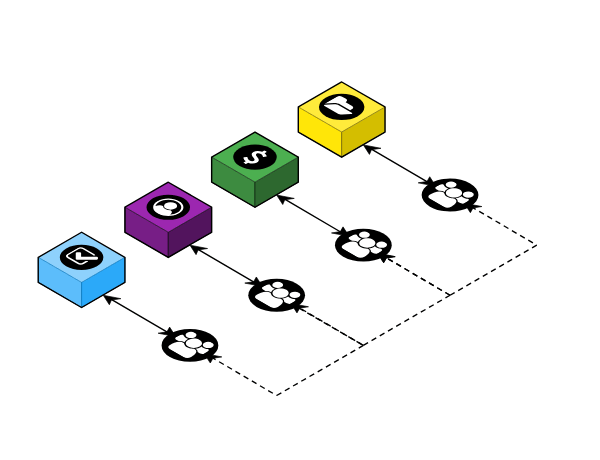
Етап I. MVP що затягнувся
Компанія має один або декілька ключових сервісів, навколо яких зав’язаний увесь бізнес. Можливо, є й інші сервіси (наприклад, за підпискою), та вони майже не пов’язані один з одним.
Взаємодія здебільшого відбувається через комунікацію людей, які користуються різними системами (“Human middleware”).
З часом бізнес зростає, координація забирає забагато часу. Компанія змушена наймати людей, які фактично займаються лише супроводом цих процесів.
Етап II. Зоопарк сервісів та Point-to-Point
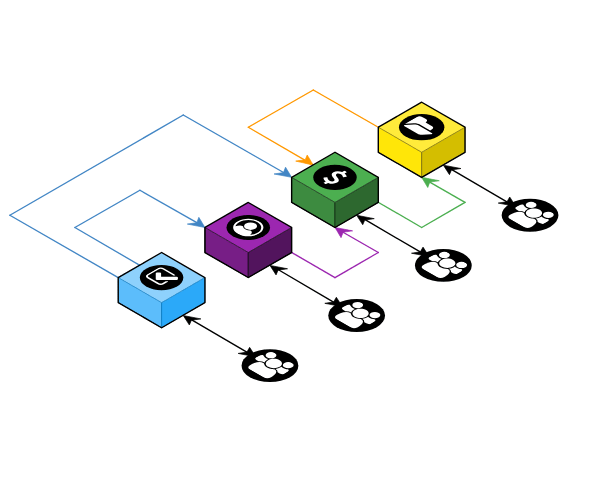
Компанія зростає, з’являється відповідальний за інфраструктуру. Він намагається зібрати команду з різних відділів, але наштовхується на вічну проблему — у всіх “немає часу”.
Сценаріїв розвитку безліч: від розпилу монолітів на мікросервіси та купівлі SaaS (Salesforce, Zendesk) до повного хаосу, коли все це впроваджується одночасно й неконтрольовано.
Результатом такого хаосу стає Point-to-Point взаємодія. Система перетворюється на клубок зв’язків: сервіси тісно зчіплені (tight coupling) та знають забагато один про одного. Як наслідок — підтримка ускладнюється, а вартість будь-яких змін зростає в геометричній прогресії.
Етап III. Middleware зрілість
З часом стає зрозумілим, що одна людина вже фізично не спроможна встигати за розвитком системи, тому компанія формує окремий підрозділ, який займатиметься інфраструктурою.
Хтось із нового відділу бере на себе роль Enterprise Architect’а та доходить висновку, що подальше зростання та зміни потребують впровадження middleware. Що зміниться:
- Розробників познайомлять з Enterprise Service Bus
- З’явиться поняття Canonical Data Model (єдиний формат даних для всієї компанії)
- Заборонять прямі виклики сервісів один до одного, усі будуть спілкуватися через брокер/шину
- Застосують патерн Strangler Fig (фікус-душитель): старий легасі-код поступово замінють новими сервісами, не вимикаючи систему.
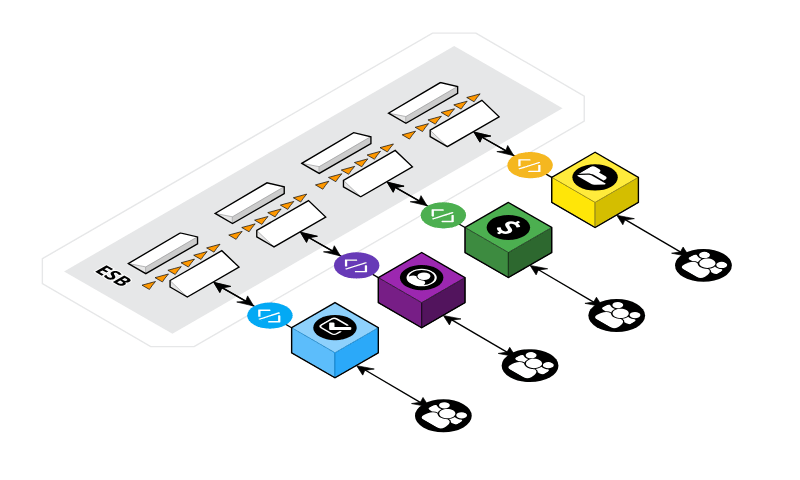
Як альтернативу або доповнення починають розглядати Integration Platform (однією з яких є Boomi, але про неї згодом).
Еволюція — це про рефакторинг та стандартизацію. Це про поступове введення правил гри (API-контракти, події), які зменшують ентропію (хаос).
Enterprise Революція
Це стрес-тест для архітектури. Це відбувається, коли велика компанія купує іншу або коли два гіганти зливаються (M&A). Тут немає часу на повільний рефакторинг — бізнес вимагає результату «на вчора».
Тут немає етапів — тут є виклики, які треба вирішувати негайно.
Уявіть ситуацію: Банк А купує Фінтех Б. Перед Enterprise Architect постає ряд завдань.
Виклик 1. Дублювання функцій
Ситуація:
- У Банку А є своя CRM («Самописна, стара, але надійна»).
- У Фінтеха Б є своя CRM («Модна, у хмарі»).
CTO приймає вольове рішення — «Rip and Replace». Протягом 6 місяців Фінтех Б зобов’язаний викинути свою систему і мігрувати в CRM Банку (чи були сумніви, хто залишиться?).
Що буде відбуватися далі? Зануритись у пекло міграційних скриптів, мапінгу полів і втрати даних? Ні. Тут критично потрібні ETL-інструменти (Extract, Transform, Load), щоб коректно «перекачати» дані з однієї структури в іншу.
Виклик другий. Ізоляція даних (Data Silos)
Ситуація:
- Ви маєте інформацію про клієнтів в двох різних системах, вони між собою не зв’язані, та не сінхронізуються.
Наслідки:
- Суперечливість даних (Inconsistency), дублювання зусиль та некоректна аналітика.
Що робити? Тут слід впровадити MDM (Master Data Management). Це технологія, процеси та політики, що дозволяють створити «Золотий запис» (Golden Record) та отримати Єдине Джерело Істини (Single Source of Truth).
Виклик третій. «Федерація»
Що відбувається:
- Іноді об’єднати системи неможливо швидко, але треба забезпечити їх одночасну роботу вже зараз.
Що буде відбуватися далі? Ми будуємо «Фасад» — спільний API, який приймає запит, а всередині «під капотом» вирішує, куди його направити: в стару систему Банку чи нову систему Фінтеху. Для користувача це виглядає як одна система, хоча всередині це «Франкенштейн».
Революція — це про інтеграцію та міграцію. Це про поєднання чужорідних систем, про адаптери, шини даних та жорсткі адміністративні рішення («ми вимикаємо цей сервер 1-го числа»).
Boomi. Пролог
Настав час розповісти безпосередньо про Boomi.
Boomi — це iPaaS (Integration Platform as a Service). Інструмент для реалізації бекенд-логіки без хардкорного кодингу (тут сумний смайлик).
Архітектурно Boomi складається з двох частин:
1. Boomi Platform (The Build)
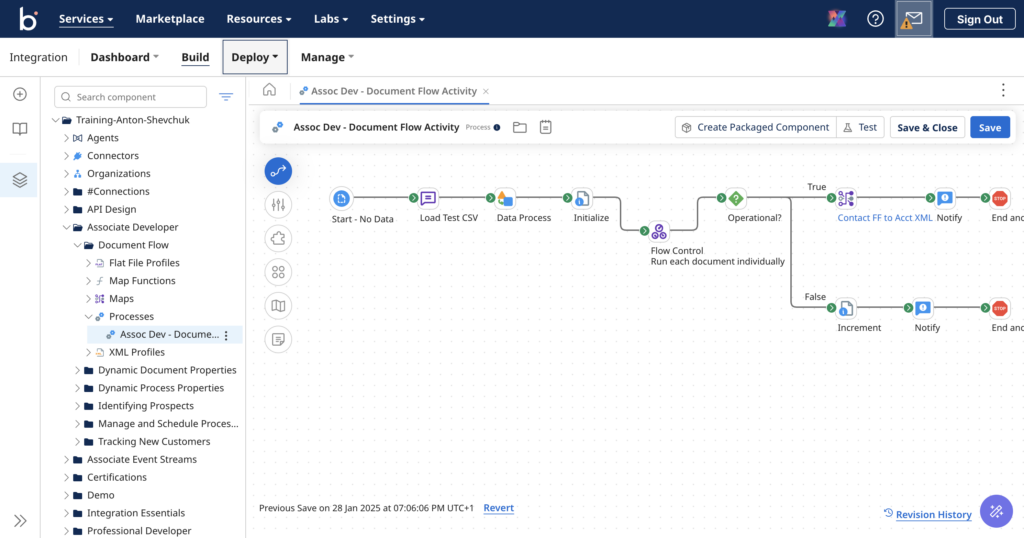
Це безпосередньо “Visual IDE” у вашому браузері, де ми розробляємо та налаштовуємо процеси. Замість написання функцій ми перетягуємо іконки:
- HTTP Client Connector
- Map Shape
- Database Connector
- та інші…
Ми поєднуємо їх стрілочками у єдиний flow.
Тут також відбуваються адміністративні дії: перегляд логів, керування налаштуваннями, формування розкладів запусків.
Все це працює у хмарі — швидко та передбачувано. Хіба що автоматичне вирівнювання на складних процесах може викликати нарікання, а так все достатньо «гладенько»:
2. The Runtime (The Execution)
Друга складова — це Runtime. Фактично, це Java-додаток (JVM), який виконує той «код», що згенерувала платформа.
Як це працює: Коли ви натискаєте “Deploy” на платформі, Boomi компілює ваш візуальний процес у пакет і відправляє його на Runtime для виконання.
Важливий момент: Існує декілька типів Runtime:
- Basic Runtime
- Runtime Cluster
- Runtime Cloud (Private або Public)
Чим вони відрізняються, коли та що обирати я про це ще розповім.
Boomi. Епізод I
Надалі я буду намагатися йти «шляхом» розвитку Enterprise та розповім де та як можна застосувати Boomi, та який Runtime краще обрати.
Почнемо з першого сценарію, коли нам треба зв’язати між собою сервіси які живуть своє життя:
Уявимо, що це маленька компанія, яка використовує сервіси за підпискою, та ці сервіси не вміють в інтеграцію один з одним. Процеси раніше підтримували люди: там статус на борді змінити, десь файли завантажити, комусь рахунок виписати.
В такому випадку нам підійде Boomi Runtime Cloud – це хмарний runtime, який хоститься і керується самою компанією Boomi, це мінімум додаткових зусиль, лише розробити процес, залити та користуватися:
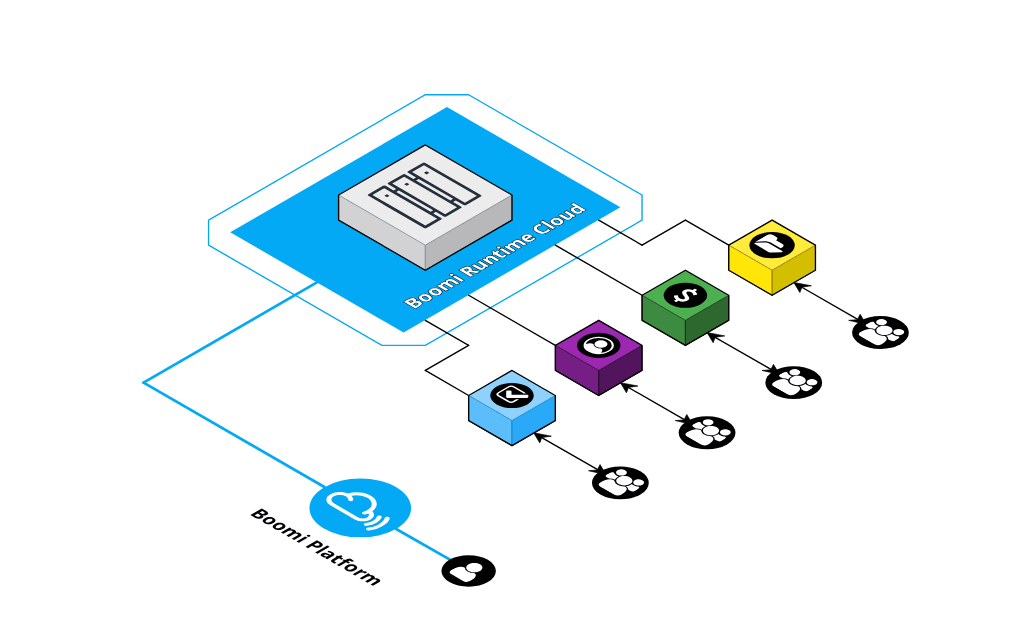
Реалтайм нам не потрібен, тож для кожного процеса можемо створити свій розклад для запуску. Процеси будуть бігати Point-to-Point між сервісами. Подібну схему можно достатньо швидко реалізувати, бо Boomi підтримує більше 1000 конекторів з коробки — https://boomi.com/connectors/ (та треба пам’ятати, що платити треба буде саме за підключені конектори):
Фактично для цього вигаданого сценарію, це виглядає як сервіс IFTTT на максималках.
Давайте розглянемо альтернативну компанію, яка має сервіси у себе в локальній мережі, чи VPC, у такому випадку Boomi Runtime Cloud не буде мати можливість співпрацювати з сервісами компанії, варіант налаштувати firewall, щоб Boomi міг стукатись до всіх внутрішніх сервісів виглядає не секьюрно. Тож ми підемо іншим шляхом, і будемо піднімати свій Runtime вже за firewall’ом:
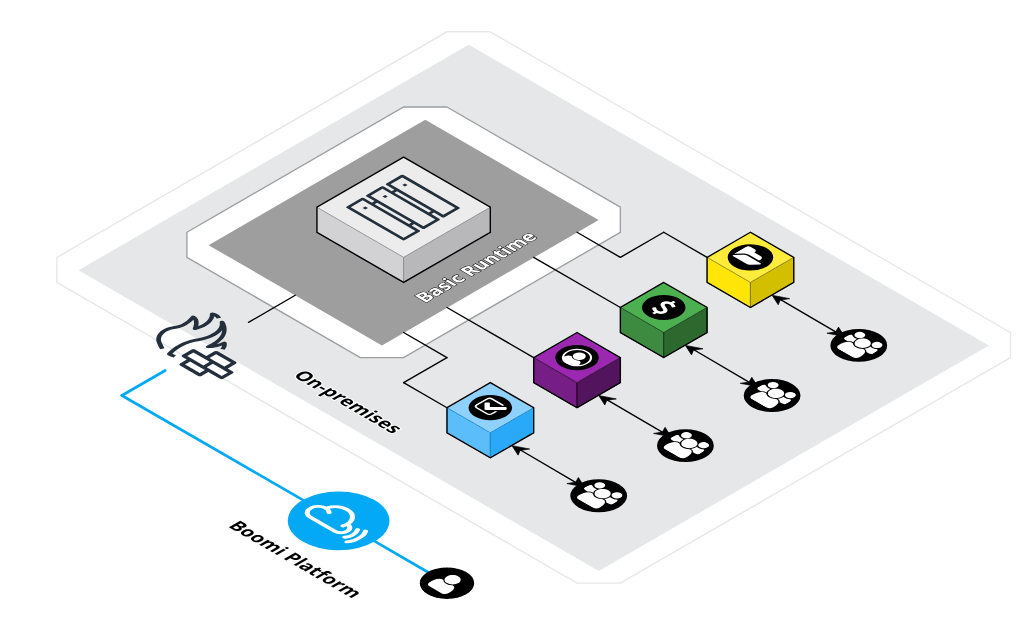
З точки зору розробки процесів, тут не буде ніяких змін, та будуть зміни в деплойменті, та відповідальність за інфраструктуру буде лягати вже на плечі DevOps’ів, тепер це їх клопіт як інстанц підняти та як його моніторити. Про те який інстанц потрібно обрати можна дізнатися з навчальних матеріалів, приведу тут лише табличку щоб було уявлення про вимоги:
| Type | Transactions Per Day | Size (cpu × mem × disk) | AWS | Azure |
|---|---|---|---|---|
| Small | <500k | 4×16×100 | m5.xlarge | Standard_D4s_v4 |
| Medium | 500k – 1m | 8×32×200 | m5.2xlarge | Standard_D8s_v4 |
| Large | 1m+ | 16×64×200 | m5.4xlarge | Standard_D16s_v4 |
Якщо чесно, що саме вклали в цю «кількість транзакцій на день», мені важко сказати, будемо вважати, що одна «транзакція», це один простий процесс, який обробляє один документ <100Кб.
Boomi. Епізод II
Поїхали далі, наш наступний приклад, це Enterprise з зоопарком Point-to-Point сервісів.
Ми не будемо прибирати цей безлад, ми опановуємо його. В цьому вигаданому сценарії ми будемо переносити процеси до Boomi, та оскільки процесів багато і вони життєво важливі для роботи компанії то нам слід буде забезпечити безвідмовну роботу нашої системи під постійним навантаженням. У Boomi для цього передбачено використання Runtime Cluster, який забезпечить як high availability так і scalability системи за рахунок часу вашої DevOps команди та можливостей Cloud провайдерів:
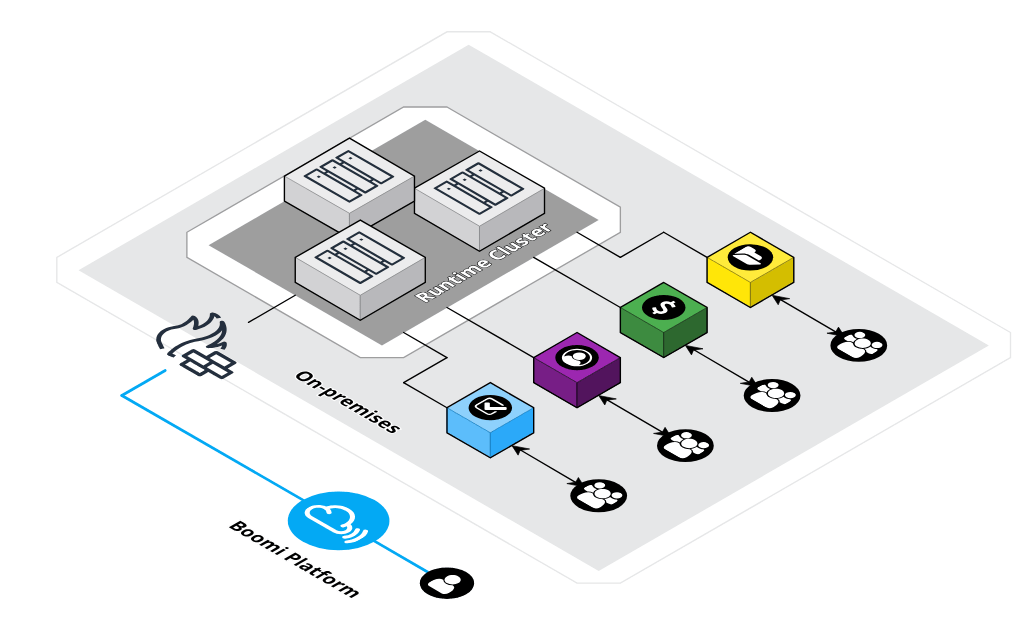
У кластері Boomi є ряд особливістей.
Перша особливість, це використання Shared File System, усі ноди монтують папку, яка відповідає за зберігання конфігів, логів та черг повідомлень, все лежить в одному місці.
Будь ласка обережно використовуйте Shared File System для зберігання тимчасових файлів якщо вам такі будуть потрібні під час виконання процесу, це може мати негативний вплив на швидкість роботи таких процесів.
Друга особливість, про яку слід пам’ятати, це те, що кількість нод в нас обмежена через Network Chatter, рекомендуєме обмеження, це 10 нод. Якщо цього вам не вистачить, то слід будувати новий кластер, і тоді треба буде розподіляти процеси по цим кластерам, що додасть клопоту усім.
Якщо що, то я трохи погуглив, та ось вам декілька статей, про сетап Cluster’а:
- High Availability AWS Integration Runtime
- Integration Runtime Installation – runtime cluster on AWS ECS
- Runtime cluster Kubernetes Azure Quick Start
Ще пів року назад, Boomi використовували неймінг Atom (Runtime) та Molecula (Cluster), тож час від часу ви будете зустрічати цю термінологію у документації.
Інформація по рекомендованому розміру кластера також є в навчальних матеріалах:
| Type | Transactions Per Day | Nodes | Size (cpu × mem × disk) | File Share |
|---|---|---|---|---|
| Small | <500k & <1 GB/batch |
3 | 4×16×100 | 200 GB 50 MiBs |
| Medium | 500k – 1m & 1-2 GB/batch |
3-5 | 8×32×200 | 500 GB 50-150 MiBs |
| Large | 1m+ & 2 GB/batch |
5-10 | 16×64×200 | 1 TB 150+ MiBs |
| Type | AWS | Real-Time Optimized AWS | Azure |
|---|---|---|---|
| Small | m5.xlarge | c5.2xlarge | Standard_D4s_v4 |
| Medium | m5.2xlarge | c5.4xlarge | Standard_D8s_v4 |
| Large | m5.4xlarge | c5.4xlarge | Standard_D16s_v4 |
Boomi. Епізод III
Настав час розповісти про організацію EDA (Event Driven Architecture) на базі Boomi.
Коли ваша Enterprise система починає використовувати шину для обміну повідомленнями ваша робота концентрується на розробці адаптерів для сервісів:
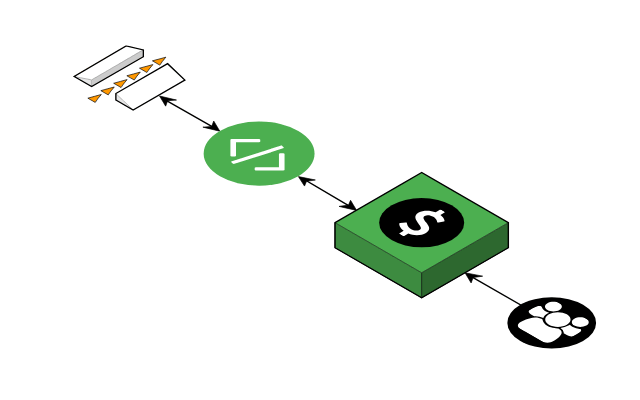
Саме такі адаптери будуть відповідати за бізнес-логіку, яка зв’язує шину подій та API сервісів. І звісно реалізацію таких сервісів ви можете покласти на Boomi:
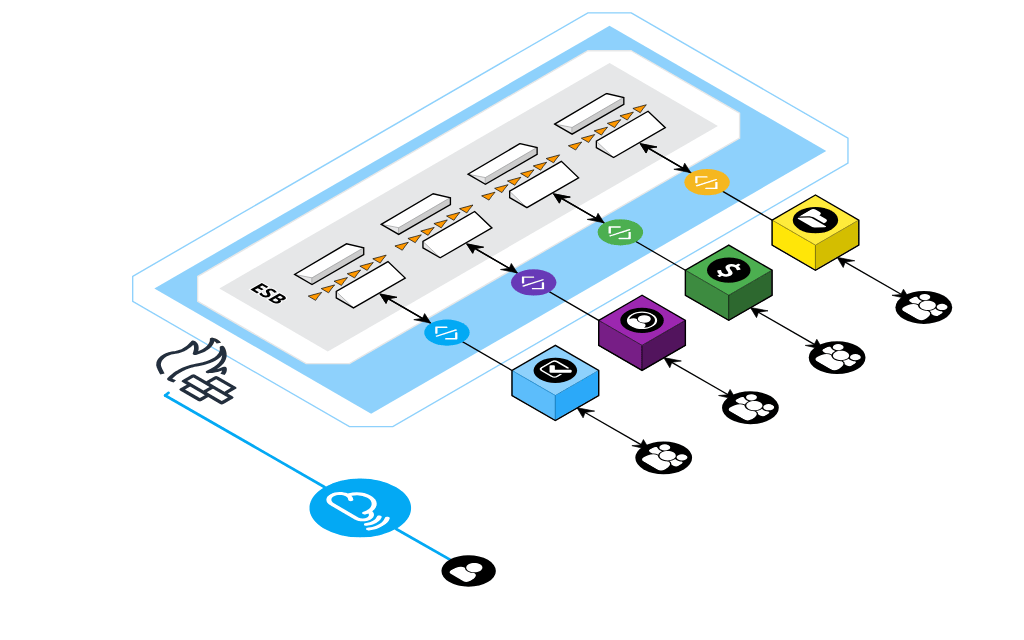
А ось з приводу яку шину вибрати якщо в вас її ще немає, то тут є декілька опцій.
Перша — використовувати вбудований до Runtime механізм черг – Boomi Atom Queue. Він живе на вашому Runtime або Runtime Cluster. Ця шина має дуже вагоме обмеження — взаємодіяти з нею можна лише з Boomi, тож ніякі зовнішні сервіси не будуть мати доступ до черги без участі Boomi. Ну і використання файлової системи (мережової для кластеру) для зберігання теж накладає обмеження на швидкодію, та і надійнійсність, це буде ваш клопіт. Моніторинг такої черги вкрай обмежений.
Boomi Atom Queue вже кличуть Legacy, та все рівно будуть підтримувати
Друга опція — Boomi Event Streams, це вже окремий SaaS сервіс від Boomi. За інфраструктуру відповідає Boomi. За допомоги API до такої шини вже можна звертатися ззовні та відправляти повідомлення до черги, а ось слухати зась. Для моніторінгу є дашборд в інтерфейсі Boomi Platform. Тут вже сплачуємо гроші за об’єм даних.
Третя опція — використовувати Kafka чи RabbitMQ, чи будь який інший брокер повідомлень. Ніяких обмежень на використання, та вся відповідальність за роботу лягає вже на вас, надійність та моніторинг – все це ваша зона відповідальності. З мого досвіду, Boomi чудово працює з Kafka, та звісно у такому випадку конектор до зовнішньої системи буде враховуватися до вашого чеку за Boomi.
Boomi. Епізод IV
Перейдемо до революційних змін Enterprise. Як ми можемо використати Boomi, коли часу в нас обмаль, а від нас вимагають результату «на вчора»?
Boomi спроєктовано таким чином, щоб ви як найшвидше пройшли шлях від вимог, розробки, та тестування та отримали результат на production.
І якщо буде потрібно швидко розробити ETL (Extract, Transform, Load) процес, то Boomi вам підійде, бо має багато вбудованих інструментів для його організації, а якщо їх вам не вистачить, то тоді вже можна і код написати для обробки документів. Boomi підтримує як JavaScript так і Groovy.
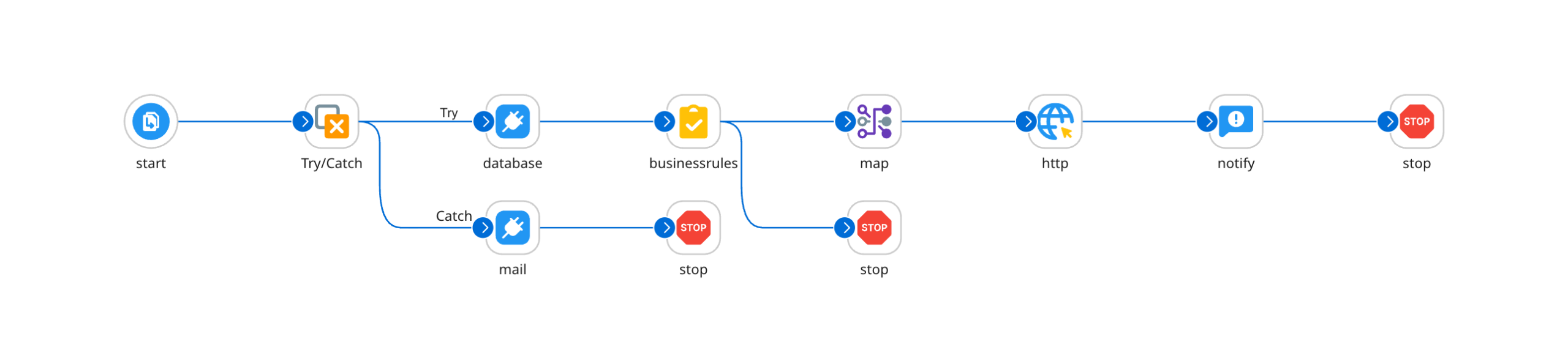
Попередній параграф був як з рекламного буклету? Ну добре, перейдемо до специфіки системи.
Почнемо з коду який ми можемо додавати до процесів.
Перша доступна опція, це може бути JavaScript, та підтримується лише ECMAScript 5, чому? Бо там не NodeJs виконує JavaScript, це робить Java машина, вона має свій власний рушій для виконання JavaScript. З плюсів – ви можете викликати вбудовані Java-класи, та навіть більше – ви можете завантажити JAR файл до вашого Runtime, та викликати його.
Друга опція, це Groovy, ми можемо використовувати версію 1.5 або 2.4. Я звісно не Groovy-розробник, але щось мені підказує, ще це доволі старі версії 🙁
Окремо варто зазначити, що прикладів коду не так багато, і це має побічну дію, що ШІ не може коректно генерувати більшість скриптів, отакої.
Що є ще? Перформанс. Тут я можу порівнювати як працює Boomi та Talend, бо ми мігрували багато процесів з одною системи до іншої, і я побачив що реалізація процесу у Boomi працює повільніше, та в мене є думка чому так відбувається – Boomi для процесів які виконуються за розкладом використовує так званий General Process Mode, у цьому режимі Boomi логує все, кожен крок, кожен документ, кожну трансформацію, все це потребує багато часу, та багато місця для логів. Чи можна обрати інший режим запуску? Так, є режим Low Latency але він не буде працювати для процесів за розкладом.
Тож який висновок? Якщо ви обрали Boomi у якості iPaaS для вашої компанії, то його можливостей скоріш за все вистачить і для побудови ETL процесів які будуть обробляти гігабайти даних. Можливо це не буде так швидко, як з рішеннями від конкурентів, та я сподіваюсь це питання розробники вирішать.
Boomi. Епізод V
Для реалізації Master Data Management в Boomi є інструмент який називається Boomi DataHub, за його допомогою ви можете вирішити проблему ізоляції даних. Ну принаймні це слідує з опису цього сервісу, бо в мене не було досвіду роботи з ним.
Отакої, коротенький епізод вийшов…
Boomi. Епізод VI
Так, а що у Boomi з можливостями по реалізації API для нашої вигаданої історії?
Boomi має 2 інструмента для цього, перший, це API Management — тут ми можемо налаштовувати доступ, генерувати ключі, встановлювати квоти. Та тут також доступний Swagger «з коробки» та Developer Portal за потреби.
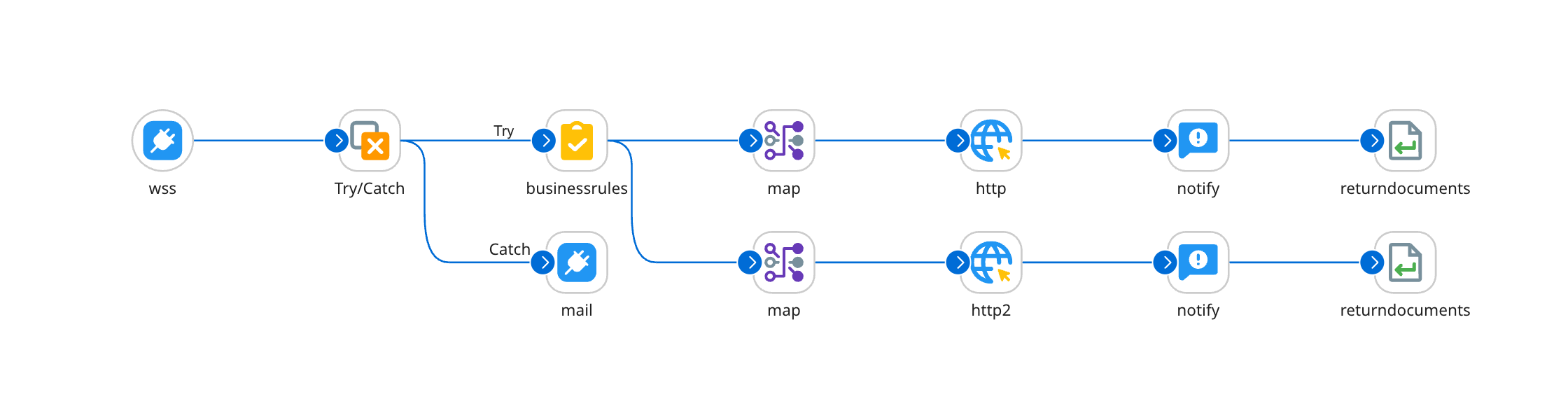
Другий інструмент, це безпосередньо Integration, ви будуєте процеси, які будуть спрацьовувати за запитом зовні на відповідні endpoint’и, і далі вже можете за якимось правилами викликати той чи інший внутрішній сервіс:
Boomi. Епілог
Щось моя розповідь затягнулась, та я сподіваюсь я допоміг вам трохи розібратися що то таке Boomi, та у яких випадках цей інструмент підійде саме вам.
Додам ще трохи матеріалів.
По перше, Boomi має досить непогані навчальні матеріали, вони доступні безкоштовно, єдина умова – для реєстрації на порталі вам слід використовувати робочу пошту, gmail не підійде. З усіх матеріалів, якщо ми кажемо про розробку інтеграцій, то я рекомендую йти шляхом розробника, та через пару тижнів вже зможете показувати перші результати своєї роботи.
Багато практичних статей ви зможете знайти на сторінці Boomi Blueprint.
Статті від ком’юніті, траплялось що відповіді я знаходив лише там – https://community.boomi.com/s/
Ну і звісно офіційний мануал, хоч і не самий інформативний, та все ж таки досить корисний.
Thank you for the clear introduction to Boomi—it’s very helpful for beginners.